













- Inicio
- Blogs
- Internet of Things
- Terminate Ethernet Cable:RJ45 connector wiring diagram
Terminate Ethernet Cable:RJ45 connector wiring diagram
RJ45 connector wiring diagram is a commonly used drawing for engineers to make cable plugs, which is commonly used in daily life or industrial applications. In this article, we will discuss in detail how to refer to the RJ45 connector wiring diagram and use CAT6 cables to make Ethernet plugs.
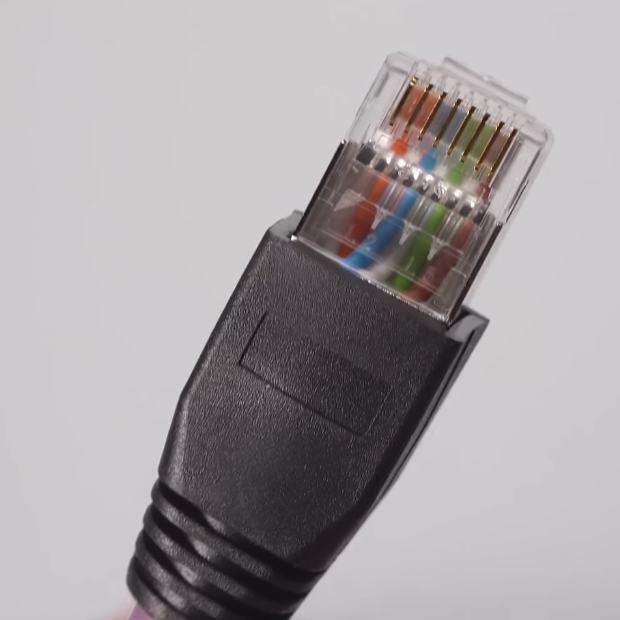
What is an RJ45 connector?
RJ45 connector is composed of a plug (commonly known as "crystal head") and a socket (module). RJ (Registered Jack) means registered socket, and RJ45 connector is a standard 8-bit modular interface abbreviation.
Working principle of RJ45 connector
The RJ45 connector is designed as a Modular Connector, which connects Internet devices by plugging and unplugging. It supports data transmission using UTP (unshielded twisted pair) or STP (shielded twisted pair) cables.
There are 8 contacts on both the plug and socket, and when the plug is inserted into the socket contacts for connection, data signals begin to transmit at high speed.
Make Ethernet plug according to RJ45 connector wiring diagram
RJ45 connector wiring diagram provides two connection methods, mainly following the international standard line sequence of TIA/EIA 568A and TIA/EIA 568B. The TIA/EIA 568B (T568B) standard is commonly used by engineers. Below, we will explain in detail the wiring diagram of the T568B standard RJ45 connector:
Prepare materials and tools
Several RJ45 connectors
One CAT5 or CAT6 cable (cable length can be cut as needed)
One cable clamp (used for stripping and crimping)
One line measuring instrument (optional, used to test network cable connectivity)
Make according to the RJ45 connector wiring diagram
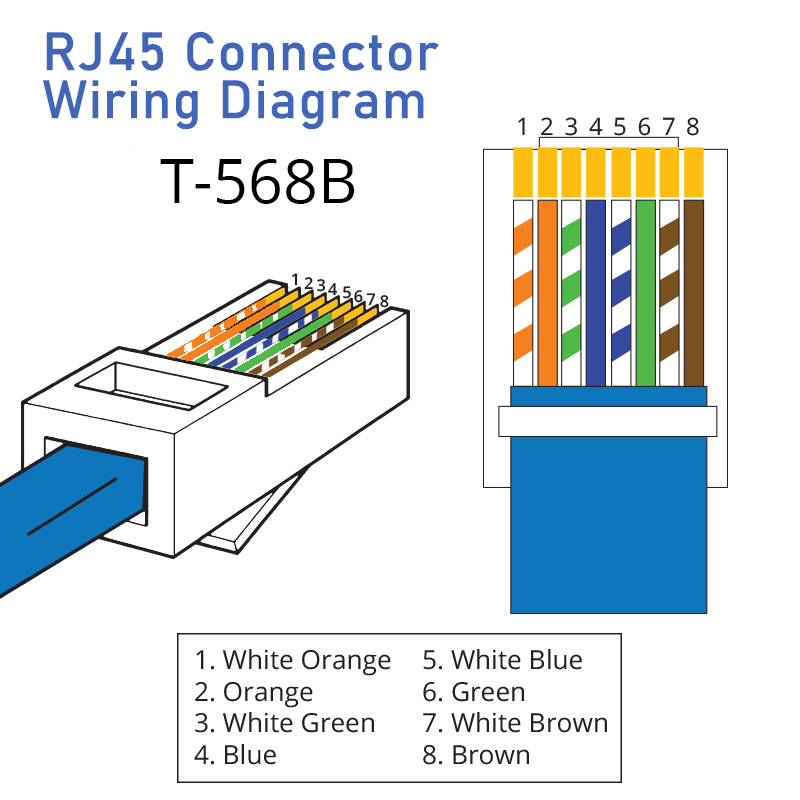
The above figure shows the RJ45 connector wiring diagram with pinout color code T568B
Wire stripping: Use network cable pliers to peel off the outer layer of CAT6 cable by about 2 centimeters, exposing the 8 cores inside. Be careful not to cut the wire core when stripping.
Sort by T-568B pinout :
- Pin 1: White and orange stripe
- Pin 2: Orange
- Pin 3: White and green stripe
- Pin 4: Blue
- Pin 5: White and blue stripe
- Pin 6: Green
- Pin 7: White and brown stripe
- Pin 8: Brown
Cutting neatly: Use the wire cutting port of the network cable pliers to cut 8 wire cores neatly, with a length of about 1.5 centimeters, ensuring that the wire cores are neat and parallel.
Insert connector: Insert the trimmed wire core into the metal pin of the RJ45 connector, paying attention to inserting the wire core to the bottom and keeping the wire sequence correct.
Crimping: Use the crimping port of the Ethernet cable clamp to press the RJ45 connector tightly, ensuring that the wire core is in close contact with the connector pins.
Difference between TIA/EIA 568A and TIA/EIA 568B
TIA/EIA 568A and TIA/EIA 568B are two common Ethernet cable wiring standards. Their main difference lies in the color sequence of the internal wire pairs of the network cable. The specific differences are as follows:
Differences in Pin Sequence Arrangement
| TIA/EIA 568A | TIA/EIA 568B | |
| Pin 1 | White and green stripe | White and orange stripe |
| Pin 2 | Green | Orange |
| Pin 3 | White and orange stripe | White and green stripe |
| Pin 4 | Blue | Blue |
| Pin 5 | White and blue stripe | White and blue stripe |
| Pin 6 | Orange | Green |
| Pin 7 | White and brown stripe | White and brown stripe |
| Pin 8 | Brown | Brown |
Application scenarios
TIA/EIA 568A: Backward compatible with single-pair and double-pair USOC cabling schemes. Although specific projects and temporary wiring may specify the need for TIA/EIA 568A standards (such as wiring under federal contracts).
TIA/EIA 568B: Only backward compatible with single pair USOC cabling scheme, which is widely used in the United States.
Differences in speed of RJ45 Ethernet plugs made with different cables
| Cable Types | Frequency | Speed |
| CAT5 | 100MHz | 100Mbps |
| CAT5E | 100MHz | 1000Mbps |
| CAT6 | 250MHz | 1000Mbps |
| CAT6A | 500MHz | 10Gbps |
| CAT7 | 600MHz | 1Gbps |
| CAT8 | 2GHz | 40Gbps |
Classification and specifications
Classified by application scenario: RJ45 connectors are mainly divided into two categories: civilian grade and industrial grade. Civil-grade RJ45 connectors are mainly used in ordinary environments such as homes and offices; Industrial-grade RJ45 connectors are designed specifically for complex and harsh environments, with higher durability and stability.
Classified by specifications:RJ45 connectors come in various sizes and models, such as 90-degree plug-in board with LED light/no light, 180-degree direct insertion with light/no light, sink board plug-in board, double-layer parallel, double-layer/with USB interface, etc.
Characteristics and advantages
High-speed transmission: RJ45 connectors support high-speed Ethernet data transmission, paired with CAT6 Ethernet cables, with a transmission speed of up to 1000Mbps, meeting the needs of modern network large volume video and image transmission.
Usability: The user-friendly plug-and-unplug design of RJ45 connectors makes device connection and disassembly easier.
Scalability: RJ45 connectors support commonly used network protocols, including Ethernet, Fast Ethernet, Gigabit Ethernet, etc.
Matters needing attention
Use appropriate tools:Professional wire strippers and crimping tools are recommended when wiring to ensure that CAT6 cables and RJ45 connectors are not damaged.
Keep the length of the wires consistent: When peeling off the insulation layer of the wires, try to make the exposed length of each wire the same, which is convenient for inserting into the RJ45 connector and fixing the wires.
Ensure that there are not too many exposed parts of the wire: When inserting the wire into the RJ45 connector pins, make sure that the exposed parts are just inserted, and do not leave too many exposed parts to avoid short circuits or looseness.
Check if the CAT6 cable is inserted correctly: Before tightening the RJ45 connector, carefully check if each wire is inserted into the corresponding pin in the correct order.
Pay attention to the quality of RJ45 connectors: connectors and cables from well-known brands to ensure the stability and reliability of signal transmission.
Test connectivity: After wiring is completed, a cable tester can be used to test the connectivity of the network cable. Connect the two ends of the measuring instrument to the two ends of the cable and observe the indicator lights on the measuring instrument. If all indicator lights light up in sequence, it indicates that the wiring is correct and the network connectivity is good.
The above are the detailed steps for making cable plugs based on the RJ45 connector wiring diagram, and I hope they will help everyone. Actually, making RJ45 cable connectors is that simple. Let's give it a try now.
Articles you may also like
NE555 datasheet and Pinout, NE555 circuits generates square waves
RS485 chip selection and instructions
RS485 chip selection and instructionsRS485 chip selection and instructions

Hall Effect Sensors & Switches