













What should I do if the motor drive board gets seriously hot?
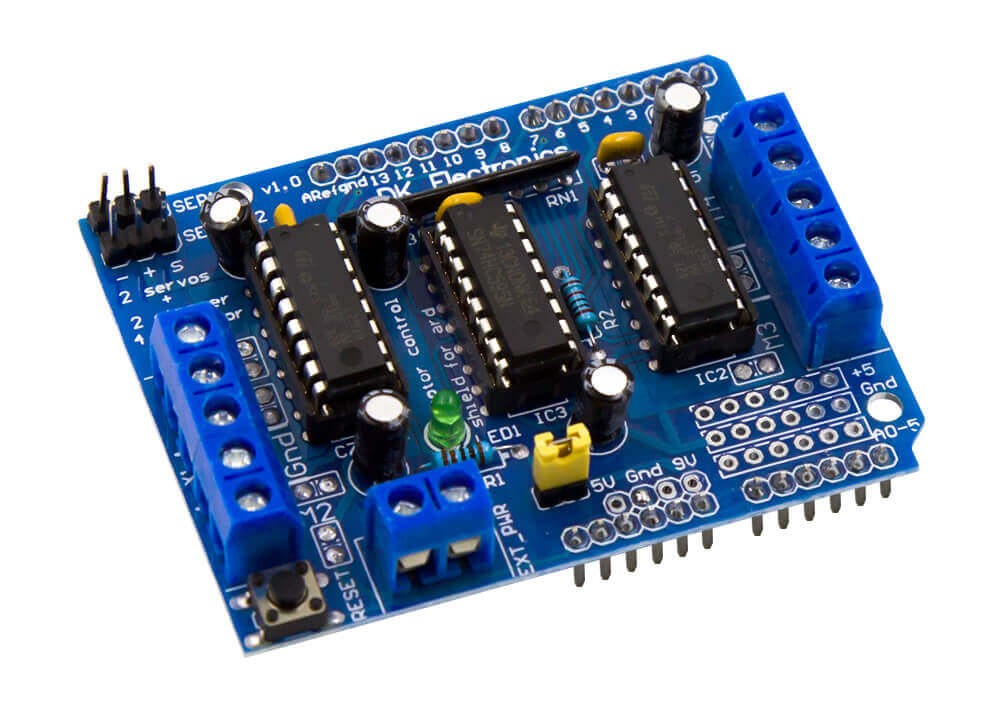
Motor drive ICs deliver large amounts of current and dissipate large amounts of electrical energy. Typically, energy is dissipated into the copper areas of the printed circuit board (PCB). To ensure adequate cooling of the PCB, special PCB design technology is required. In the first part of this article, you will be given some general advice on PCB design for motor driver ICs.
Use a large area of copper
Copper is an excellent conductor of heat. Since the PCB's substrate material (FR-4 glass epoxy) is a poor thermal conductor. Therefore, from a thermal management perspective, the more copper areas on a PCB, the more ideal the heat conduction will be.
For example, a 2-ounce (68 micron thick) copper plate conducts heat better than a thinner copper plate. However, thick copper is not only expensive, but also difficult to achieve fine geometries. Therefore, a 1-ounce (34-micron-thick) copper plate is usually used. The outer layer board often uses 1/2 ounce copper plating, with a thickness of up to 1 ounce.
The inner layers of multilayer boards often use solid copper plates for better heat dissipation. However, because its planar layer is typically located in the center of the board stack, heat can be trapped inside the board. Then, you can add a copper area to the outer layer of the PCB and use vias to connect to the inner layer to transfer the heat out.
Heat dissipation will also be more difficult due to the presence of traces and components in a double-layer PCB. Therefore, the motor driver IC should use as many solid copper plates and vias as possible to facilitate heat dissipation. Pouring copper on both sides of the outer board and using vias to connect them spreads the heat to different areas separated by traces and components.
Traces must be wide—the wider, the better!
Because the current flowing through the motor driver IC is large (sometimes in excess of 10A), the width of the PCB traces leading into the chip should be carefully considered. The wider the trace, the lower the resistance. The width of the trace must be adjusted to ensure that the resistance in the trace does not cause excessive energy dissipation and increase the temperature of the trace. But traces that are too thin can be easily blown like an electrical fuse.
Designers often use the IPC-2221 standard to calculate appropriate trace thicknesses. The specification has a chart showing the copper cross-sectional area and allowable temperature rise for different current levels, which can be converted to trace width for a given copper layer thickness. For example, carrying 10A of current in a 1-ounce copper layer requires exactly 7mm wide traces to achieve a 10°C temperature rise, so for 1A of current, only 0.3mm of traces are needed.
If extrapolated this way, it seems impossible to run 10A through the micro IC pad.
Therefore, it is important to understand the IPC-2221 standard's width recommendations for long PCB traces of constant width. If the trace is connected to a larger trace or copper area, there is no ill effect in using a small section of the PCB trace to carry the larger current. This is because short, narrow PCB traces have low resistance and the heat they generate is drawn into the wider copper area. As you can see from the example in Figure 1, even though the thermal pad in this device is only 0.4mm wide, it can carry up to 3A of continuous current because the traces are widened as close as possible to the actual width of the device.
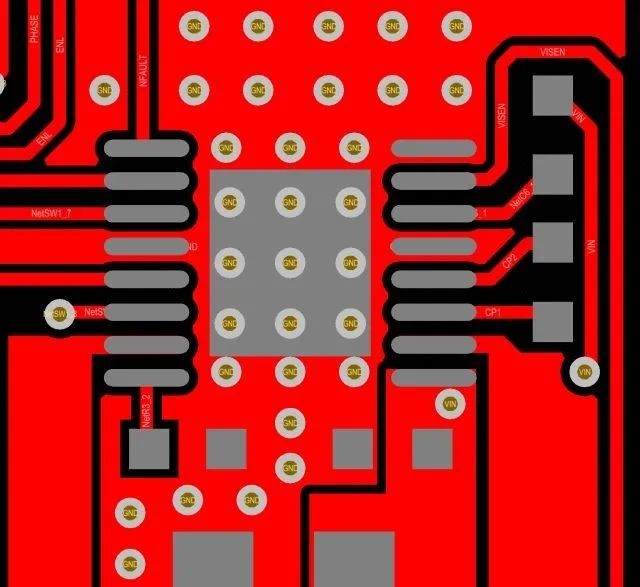
Figure 1: Widen PCB traces
Because the heat generated by narrower traces is conducted to the wider copper area, the temperature rise of narrow traces is negligible.
Traces embedded in the inner layer of the PCB do not dissipate heat as well as the outer traces because the insulator does not conduct heat well. Because of this, inner traces should be twice as wide as outer traces.
Table 1 roughly gives the recommended width for long traces (greater than 2cm) in motor drive applications.
| Current (RMS or DC) | Trace width is 1 oz copper | Trace width is 2 oz copper | ||
| outer layer board | inner panel | outer layer board | inner panel | |
| ≤1A | 0.6mm | 1.2mm | 0.3mm | 0.6mm |
| 2.5A | 1mm | 2mm | 0.5mm | 1mm |
| 5A | 2.5mm | 5mm | 1.2mm | 2.5mm |
| 10A | 7mm | 14mm | 3.5mm | 7mm |
Table 1: PCB trace width
If space permits, wider traces or copper pours can minimize temperature rise and reduce voltage drops.
Thermal vias - the more the better
A via is a small plated hole commonly used to carry signal traces from one layer to another. As the name suggests, thermal vias transfer heat from one layer to another. Proper use of thermal vias can effectively help PCB heat dissipation, but it also needs to consider many issues in actual production.
Vias have thermal resistance, which means that whenever heat flows through the via, there is a temperature difference across the via, measured in degrees Celsius per watt. Therefore, in order to minimize the thermal resistance and improve the heat dissipation efficiency of the via, the via should be designed larger, and the larger the copper area in the hole, the better (see Figure 2).
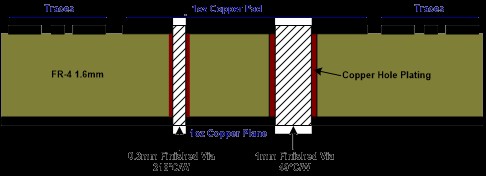
Figure 2: Via cross-section
Although large vias can be used in open areas of the PCB, vias are often placed inside the thermal pads because this allows heat to be dissipated directly from the IC package. In this case, it is not possible to use large vias because too large a plated hole can lead to "tin bleed", where the solder used to connect the IC to the PCB flows down the through hole, causing poor solder joints.
There are several ways to reduce "tin bleed". One is to use very small vias to reduce the amount of solder seeping into the holes. However, the smaller the vias, the higher the thermal resistance, so to achieve the same heat dissipation performance, more small vias are needed.
Another technique is to "cover" the vias on the backside of the board. This requires removing the openings in the solder mask on the backplane so that the solder mask material covers the vias. The solder mask will cover the small vias so that solder cannot penetrate the PCB.
But this creates another problem: flux retention. If solder mask is used to cover the via, the flux will be trapped inside the via. Some flux formulations are corrosive and will affect the reliability of the chip if not removed for a long time. Fortunately, most modern no-clean flux processes are non-corrosive and should not cause problems.
It should be noted here that the heat dissipation holes themselves do not have a heat dissipation function, and they must be directly connected to the copper area (see Figure 3).

Figure 3: Thermal vias
It is recommended that the PCB designer negotiates with the SMT process engineer at the PCB assembly plant to find the best via size and structure, especially when the via is located inside the thermal pad.
Soldering the thermal pad
In TSSOP and QFN packages, a large thermal pad is soldered to the bottom of the chip. The pads here are connected directly to the back of the die to dissipate heat from the device. The pads must be soldered well to the PCB to dissipate the power.
IC specifications do not necessarily specify pad openings for solder paste. Usually, SMT process engineers have their own set of rules for how much solder to put and what shape to use for the via mold.
If you use an opening the same size as the pad, you will need to use more solder. As the solder melts, its tension causes the surface of the device to bulge. In addition, it can cause solder voiding (dimples or gaps inside the solder). Solder voiding occurs when the volatile substances of the flux evaporate or boil during the solder reflow process. This can cause solder to bleed out of the joint.
To solve these problems, solder paste is usually deposited in several small square or circular areas for pads with an area larger than about 2mm2 (see Figure 4). Distributing the solder into multiple smaller areas allows the volatile substances in the flux to evaporate more easily, preventing the solder from leaching out.
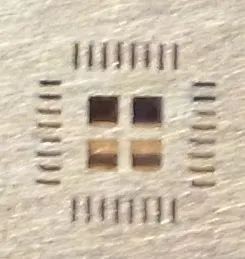
Figure 4: QFN welding tool
Once again, it is recommended that the PCB designer and the SMT process engineer jointly negotiate the correct thermal pad mold opening. You can also refer to some papers on the Internet.
Component placement
The component placement guidelines for motor driver ICs are the same as for other power ICs. The bypass capacitor should be placed as close to the device power pin as possible, and a large-capacity capacitor should be placed next to it. Many motor driver ICs will use bootstrap capacitors or charge pump capacitors, and these should also be placed near the IC.
Please refer to the component placement example in Figure 5. Figure 5 shows the MP6600 stepper motor driven two-layer board PCB layout. Most of the signal traces are routed directly on the top layer. Route the power traces from the bulk capacitor to bypass and use multiple vias on the bottom layer and multiple vias on the replacement layer.
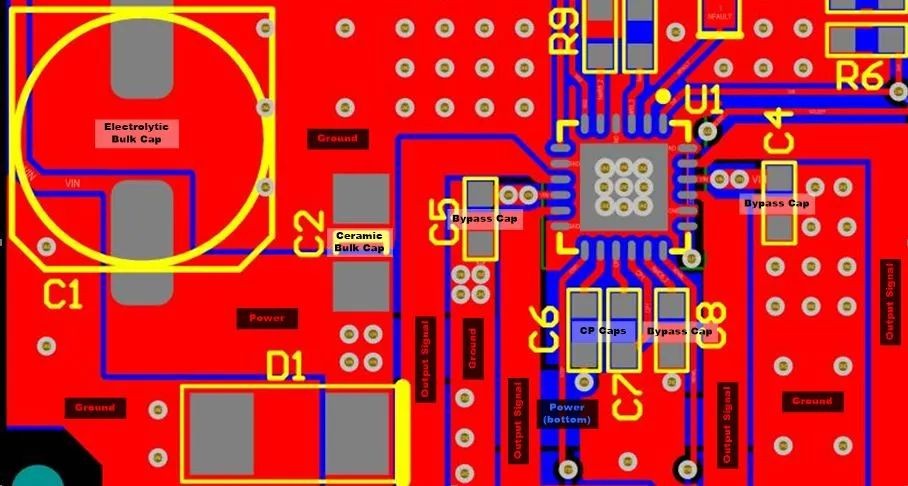
Figure 5: MP6600 component placement
The above article provides some general advice on designing PCB boards with motor driver ICs, requiring careful PCB layout to achieve proper performance. Next, some specific PCB layout recommendations are provided for motor drivers using typical packages.
Lead package layout
Standard leaded packages, such as SOIC and SOT-23 packages, are commonly used in low-power motor drives (Figure 6).
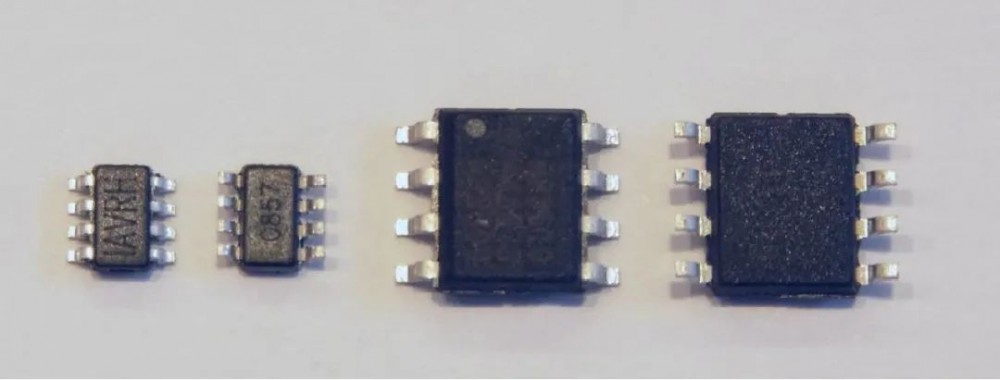
Figure 6: SOT 23 and SOIC packages
In order to fully improve the power consumption capability of the lead package, MPS uses a "flip chip lead frame" structure (Figure 7). Without bonding wires, copper bumps and solder are used to bond the chip to metal leads, allowing heat to be conducted from the chip to the PCB through the leads.
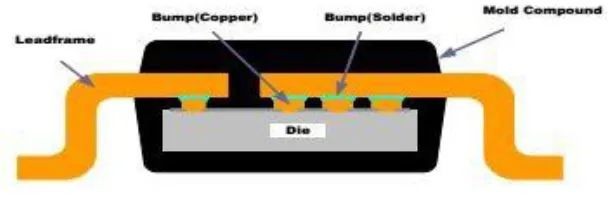
Figure 7: Flip chip leadframe
Thermal performance is optimized by connecting larger copper areas to leads that carry larger currents. On a motor driver IC, typically the power, ground, and output pins are connected to copper areas.
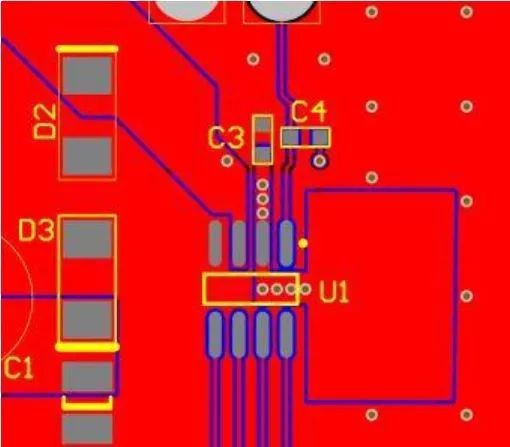
Figure 8: Flip chip SOIC PCB layout
Figure 8 shows a typical PCB layout for a “flip chip leadframe” SOIC package. Pin 2 is the device power pin. Note that the copper area is placed close to the top device, while several thermal vias connect this area to the copper layer on the backside of the PCB. Pin 4 is the ground pin and is connected to the surface ground copper area. Pin 3 (device output) is also routed to a larger copper area.
QFN and TSSOP packages
The TSSOP package is rectangular and uses two rows of pins. TSSOP packages for motor driver ICs typically have a large exposed plate on the bottom of the package to remove heat from the device (Figure 9).
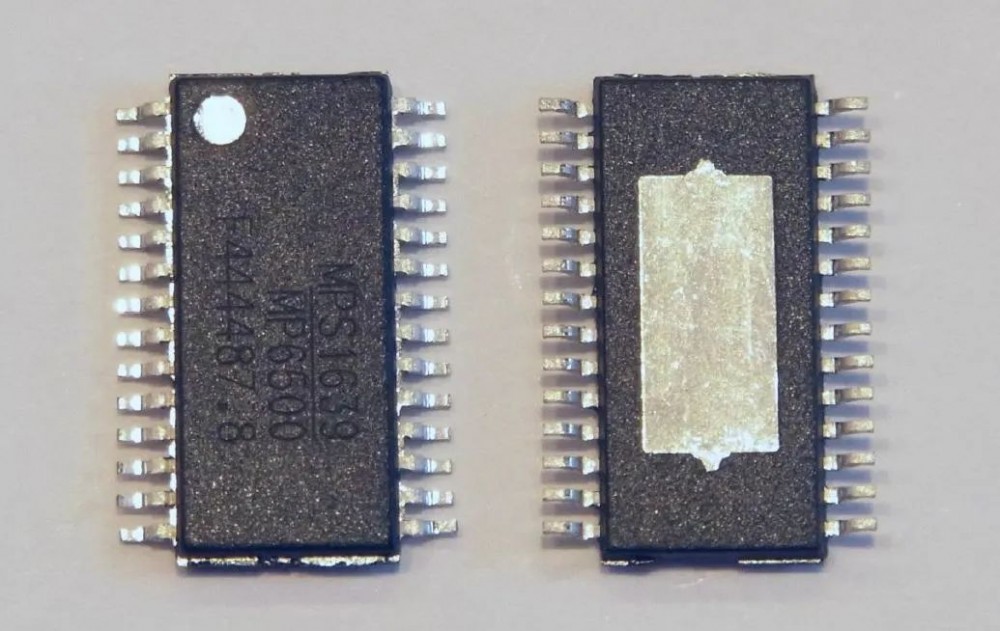
Figure 9: TSSOP packaging
The QFN package is a leadless package with a plate around the outer edge of the device and a larger plate in the center of the bottom of the device (Figure 10). This larger plate is used to absorb heat from the chip.
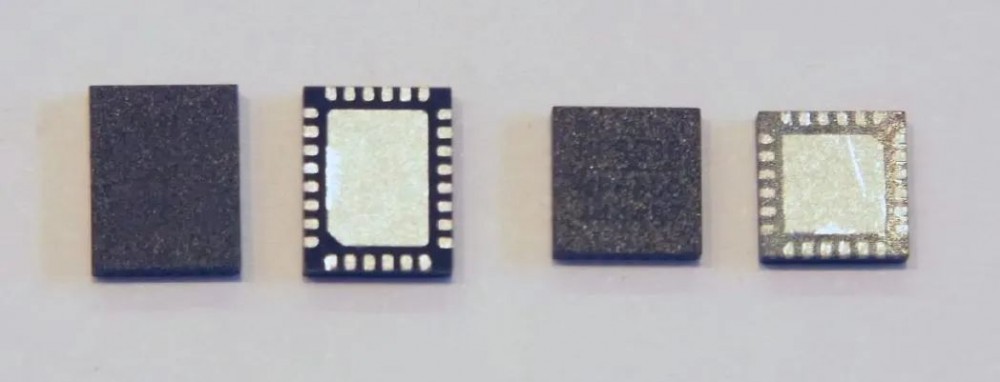
Figure 10: QFN package
To remove heat from these packages, the exposed boards must be well soldered. The exposed plate is usually at ground potential and therefore has access to the PCB ground plane. In the example of the TSSOP package in Figure 11, an 18-via array is used with a drill diameter of 0.38 mm. The calculated thermal resistance of this via array is approximately 7.7°C/W.
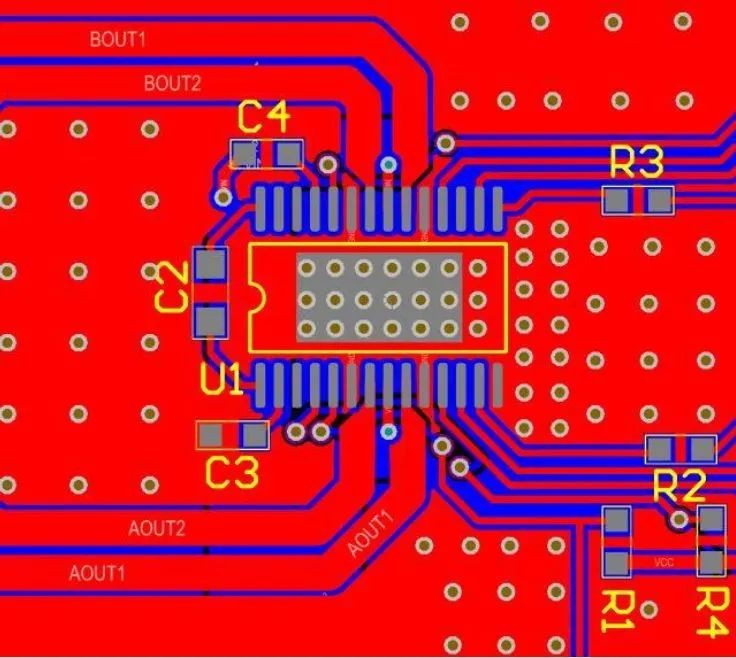
Figure 11: TSSOP PCB layout
Typically, these thermal vias use drill diameters of 0.4 mm and smaller to prevent tin bleed through. If the SMT process requires smaller apertures, the number of holes should be increased to keep the overall thermal resistance as low as possible.
In addition to the vias located in the board area, thermal vias are also provided in the external area of the IC body. In a TSSOP package, the copper area can extend beyond the package ends, which provides another path for heat in the device to pass through the top copper layer.
The board around the edge of the QFN device package avoids using a copper layer on top to absorb heat. Thermal vias must be used to dissipate heat to the inner layer or bottom layer of the PCB.
The PCB layout in Figure 12 shows a small QFN (4 × 4 mm) device. Only nine thermal vias are accommodated in the exposed board area. (See Figure 12) Therefore, the thermal performance of this PCB is not as good as the TSSOP package shown in Figure 11.
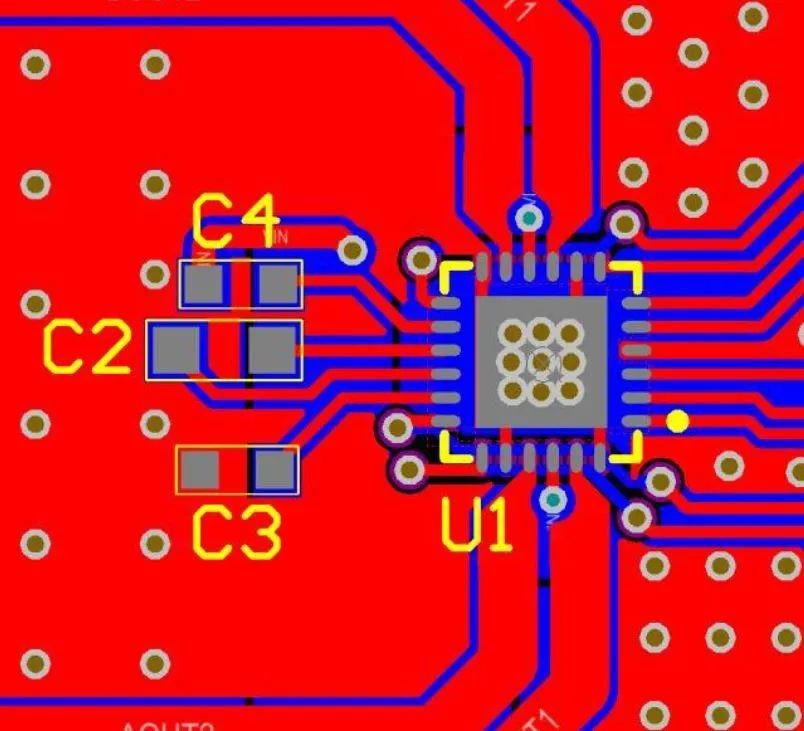
Figure 12: QFN (4mmx4mm) layout
Flip chip QFN package
Flip-chip QFN (FCQFN) packages are similar to regular QFN packages, but the die is flip-chip connected directly to the board on the bottom of the device rather than using bond wires to connect to the package board. These boards can be placed on the opposite side of the heat-generating power devices on the chip, so they are usually arranged in long strips rather than small plates (see Figure 13)
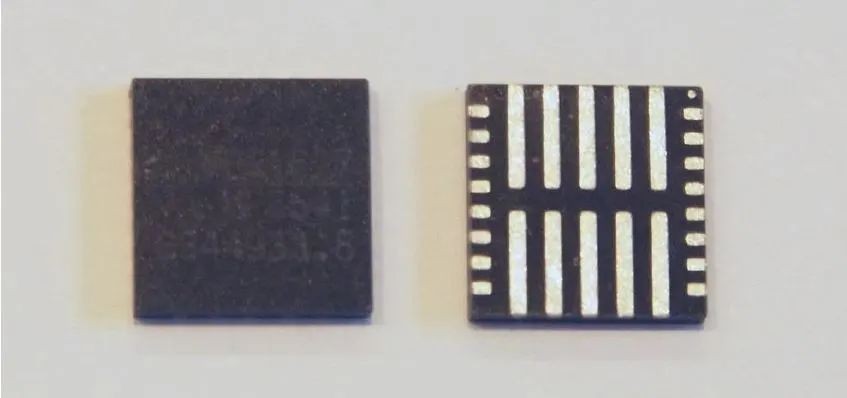
Figure 13: FCQFN package
These packages use rows of copper bumps on the surface of the chip bonded to the leadframe (Figure 14).
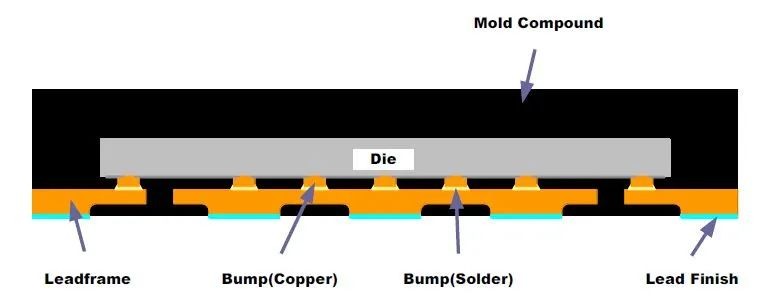
Figure 14: FCQFN structure
Small vias can be placed within the board area, similar to regular QFN packages. On multilayer boards with power and ground planes, vias connect those boards directly to the layers. In other cases, the copper area must be connected directly to the board in order to draw the heat from the IC into the larger copper area.
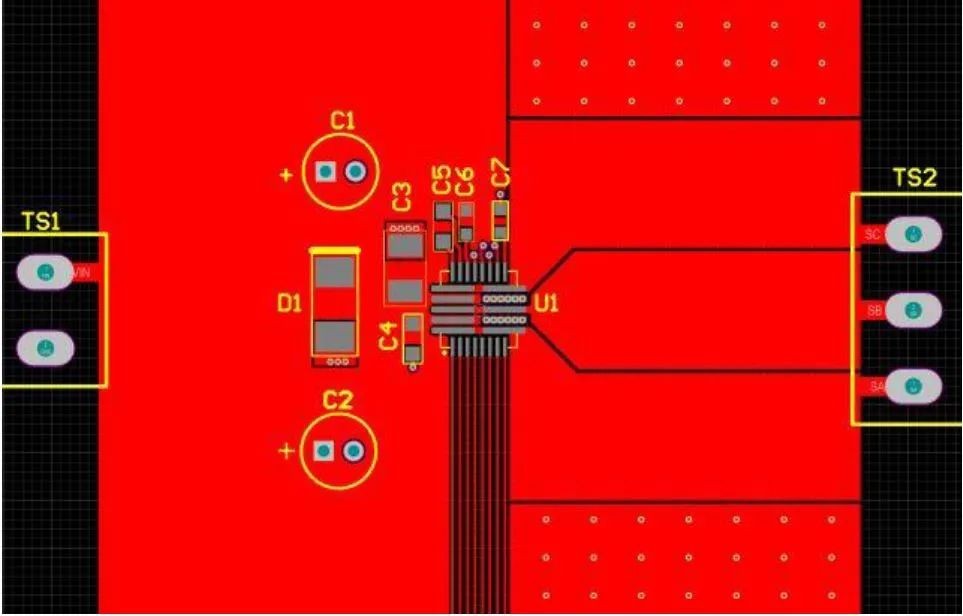
Figure 15: FCQFN PCB layout
Figure 15 shows the power stage IC MP6540 from MPS Corporation. The device has long power and ground planes, and three outputs. Note that the package is only 5mmx5mm.
The copper area on the left side of the device is the power input port. This larger copper area connects directly to the device's two power planes.
The three output boards are connected to the copper area on the right side of the device. Note that the copper area expands as much as possible after exiting the board. This allows adequate heat transfer from the plate to the ambient air.
Also, note the rows of small vias in the two boards on the right side of the device. The boards are grounded and a solid ground plane is placed on the back of the PCB. The through holes have a diameter of 0.46 mm and the drilled holes have a diameter of 0.25 mm. The vias are small enough to fit within the board area.
To summarize, in order to implement a successful PCB design using motor driver ICs, the PCB must be carefully laid out.

Articles you may also like
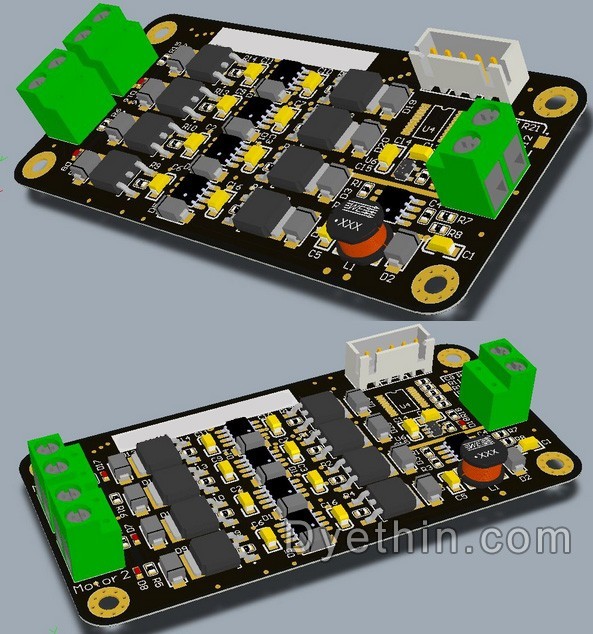
Design of High Current H-Bridge Motor Drive Circuit
The working principle, key parameters, and selection of TVS

Understanding NAND Gate: The Universal Logic Gate in Digital Circuits
Gas Discharge Tube Symbols, Characteristics and Structure

-
panasonic-electronic-components
63V 47μF SMD aluminum capacitor, 125°C, low ESR, AEC-Q200 qualified
-
-
-
-
-
-
-
-