














- Strona główna
- Blogs
- Basic knowledge
- What is a TF Card: A Simple Guide
What is a TF Card: A Simple Guide
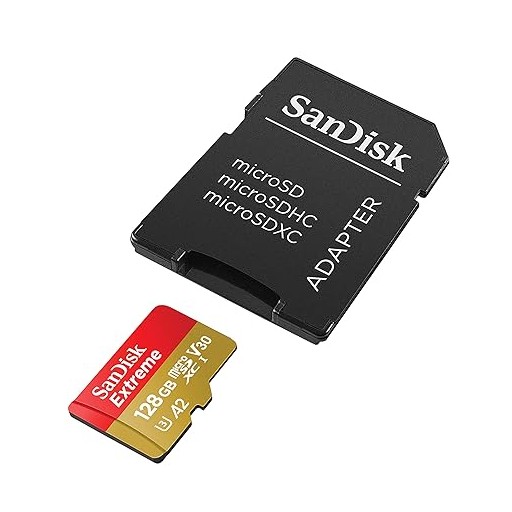
In our world today, keeping our digital stuff with us, like photos and songs, is essential. This is where TF cards, or as many call them, microSD cards, step in. These tiny cards are super helpful in carrying loads of data around our gadgets like phones, tablets, cameras, and even drones. But what is a TF card exactly? And why does everyone seem to be talking about them? Let's dive into the world of TF cards. We'll find out how we use them, the good stuff about having them, and why they're so essential in our world full of digital things.
What is a TF Card?
Imagine a tiny chip, no bigger than your thumbnail that can hold a whole library of books or thousands of photos. That's a TF card, also known as a TransFlash card. They're the tiny memory cards you slip into your phone, tablet, or camera to store all your favorite moments and music. Though people might call them microSD cards, TF cards came first. They're the ancestors of today's microSD cards, which can hold more songs or pictures and allow users to share them more quickly.
History and Evolution
It's 2004, and everyone still thinks flip phones are the height of technology. Enter the TF card — a storage card that's so small it's perfect for these pocket-sized gadgets. The TF card grew as those devices got even tinier and more powerful. It transformed into what we now call the microSD card. Sure, the name changed slightly, but they stuck to the same idea: packing lots of storage into a card small enough to fit on your fingertip. Now, you can hold microSD cards anywhere, from a handful to a warehouse's worth of digital stuff.
Comparison with Other Formats
Let's line up all these memory cards by comparing apples and oranges. TF cards, or the newer microSD cards, are the apples – tiny and compact, fitting into the most miniature gadgets. Conversely, you've got the oranges – your regular SD cards and the larger CompactFlash cards. They can store a lot, too, and are pretty quick when moving your photos and videos around, but they need a bit more room. So, whether you're about saving space or sheer size doesn't concern you, there's a card that fits just right.
What is a TF Card Used For?
Imagine a tiny card that magically gives you extra space on your phone or lets your camera snap pics without fuss. That's what TF cards, often called microSD cards, do. They can squeeze into all kinds of electronic buddies – from your pocket-sized smartphone to your high-flying-flyin drone.
Smartphones and Tablets
With phones and tablets, think of a TF card as a roomy backpack for all the stuff you want to carry. More photos? More tunes? More games? No problem. Pop in a TF card, and you're ready to save all those moments and apps without getting the dreaded "Storage Full" alert.
Digital Cameras and Camcorders
TF cards are like an infinite roll of film or a never-ending tape for the shutterbugs and filmmakers. They save all the incredible shots and videos, letting you relive memories or create new ones without worrying about space.
Drones and Action Cameras
Tiny but mighty TF cards are perfect for drones and action cameras. They only take up a little space but can store all the fantastic aerial pictures and heart-pumping videos you capture.
Gaming Consoles and Portable Media Players
Gamers and movie lovers, rejoice! TF cards are your save points and your portable movie library. They hold all your progress and all the entertainment you could ask for, so you're always just a play button away from the fun.
Benefits of Using TF Cards
• Portability: They're so small that you can take them anywhere and transfer your digital stuff between gadgets with no sweat.
• Expandability: It's like upgrading your device's closet space without buying a new one.
• Durability: They're tough little nuggets – ready for adventures and outdoor escapades without flinching.
• Compatibility: They play nice with others, fitting into all kinds of gadgets with some help from an adapter.
With TF cards, you get a mini but mighty storage solution that lets your digital life grow without limits – all while keeping your tech-savvy heart happy.
What is a TF Memory Card?
Think of a TF memory card, which many call a microSD card, as a tiny suitcase for all your digital things. It's a small card you can slide into phones, tablets, cameras, and gadgets to store photos, videos, and music.
Key Specifications of TF Memory Cards
• Capacity: These cards come in different sizes – some can only hold a few hundred songs (128MB), and some can keep everything from every vacation you've ever been on (up to 1TB). You choose how big you need.
• Speed Class: Speed class is like the speed limit sign on the card's road. It tells you how fast data can drive down the road. A Class 2 card is like a slow-moving bike, while a Class 10 is a speedy car. For filming in high-definition or doing things where you can't afford to wait, you'll need something that says UHS-I or UHS-II – that's like a race car.
• Form Factor: This means the size of the card. TF cards are itty-bitty, about the size of your fingernail, so they only take up a little room.
Compatibility and Usage
TF memory cards are like the chameleons of the electronic world; they can fit into many different gadgets. But you must ensure they match—like checking if a puzzle piece fits. Your device has the maximum size it can work with, and you'll want to look at that before buying a card. Also, with a special little adapter, you can fit a TF card into bigger SD card slots, making it easy to move your stuff around.
By picking the right TF memory card for your device, you can ensure you have space for all your essential digital bits and pieces without a hitch.
How to Format a TF Card
Think of formatting your TF card (a microSD card), like setting up your room for a new look. You clear out everything, then organize it to suit your style so you can quickly put in and take out whatever you need. When you format a TF card, you're getting it ready to store your stuff so your device can understand.
Formatting on Windows
• Insert the TF Card: Plug in the TF card to your computer with the help of a card reader.
• Open File Explorer: Click 'This PC' and look for your TF card.
• Format the Card: Right-click on your TF card and pick 'Format.' Choose FAT32 if your card is 32GB or smaller, or exFAT if it's bigger, then hit 'Start.'
Formatting on macOS
Insert the TF Card: Connect your TF card to your Mac with a card reader.
Open Disk Utility: This is hiding in your 'Utilities' folder inside 'Applications.'
Format the Card:
Here is how:
• Click on your TF card in the sidebar.
• Hit 'Erase.'
• Pick MS-DOS (FAT) if your card is 32GB or smaller or ExFAT if it's bigger.
• Hit 'Erase.'
Formatting on Android
Insert the TF Card: Pop your TF card into your Android card slot.
Open Settings: Look for 'Storage' or 'Storage & USB.'
Format the Card:
• Tap your TF card.
• Select 'Format' or 'Format as portable storage.'
• Confirm that's what you want to do.
Essential Tips for Safe Formatting
• Backup Data: It's like packing your stuff before a big move. Save what's important to you elsewhere before you start formatting because you'll lose everything on the card.
• Eject Properly: When done, safely remove the TF card to keep your data safe.
• Check Compatibility: Make sure the way you're organizing things (the file system you're using) fits well with your device before you start to avoid headaches later.
By following these instructions and being careful, you can quickly get your TF card ready to store all your digital goodies.
Where to Buy TF Cards
When buying a TF or microSD card, think of it as shopping for a small electronic suitcase for your digital belongings. Try buying from stores or websites you trust to get a natural, good-quality product. You can find a variety of TF cards on popular websites like Amazon, Best Buy, and Walmart. Also, you can go to the maker's website, like SanDisk or Samsung, to ensure you're getting the real deal.
Choosing the Right Brand
Some top-notch TF card brands include SanDisk, Samsung, Kingston, and Lexar. These guys are known for making dependable, long-lasting, high-performance cards. Reading what other buyers say about their products and checking out their ratings can help you pick the right one.
Things to Keep in Mind When Buying
• Capacity: Think about how much storage you need. Do you need a small suitcase or a large one? The capacity ranges from a few GB to several TB. What might you be storing? Photos, videos, or apps?
• Speed Class: Check out the card's speed if you want to save high-quality videos or transfer data quickly. Go for Class 10, UHS-I, or UHS-II for the best performance.
• Price: Compare prices across several retailers and brands to find the best deal for your pocket. You can find good deals during sales or discounts.
• Compatibility: Verify that the TF card you're thinking of getting will work with your device, phone, camera, or some other gadget.

FAQs
Articles you may also like
CR2025 Battery: Equivalent, Specifications and Replacements
Understanding Toggle Switches: A Comprehensive Guide
CR1632 vs CR2032: Are CR1632 and CR2032 battery equivalent?
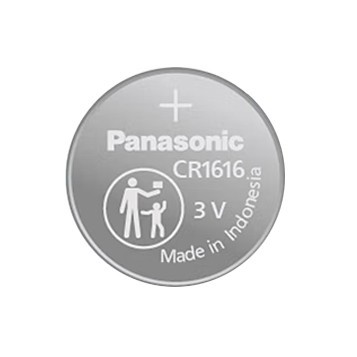
CR1616 Battery Equivalent: Best Replacement Guide

-
-
-
-
-
-
-
-
-
lattice-semiconductor-corporation
IC In-System Programmable High Density PLD CPGA-84